Smart Parse Saved My Sanity, AI Parse Saved My Weekend
How PK-Swift evolved from strict CSV input to dual parsing modes, and what non-developers should copy from that workflow.
More in Build Notes
- The VORA Overhaul: Dropping Real-Time Q&A, Building Human-in-the-Loop Memos, and a Three-Column Layout
- Mobile-First Playground: Making an Astrology Grid Actually Work on a Phone (And Go Viral While Doing It)
- How I Fixed AI Over-correction
- I Spent 3 Hours Trying to Proxy a Blog Subdomain. Here's My Descent Into Madness.
- The i18n + SEO Cleanup Chronicles: Canonical Chaos, hreflang Therapy, and Other Adventures
I used to think users would give me clean CSV files.
That thought lasted about 12 hours.
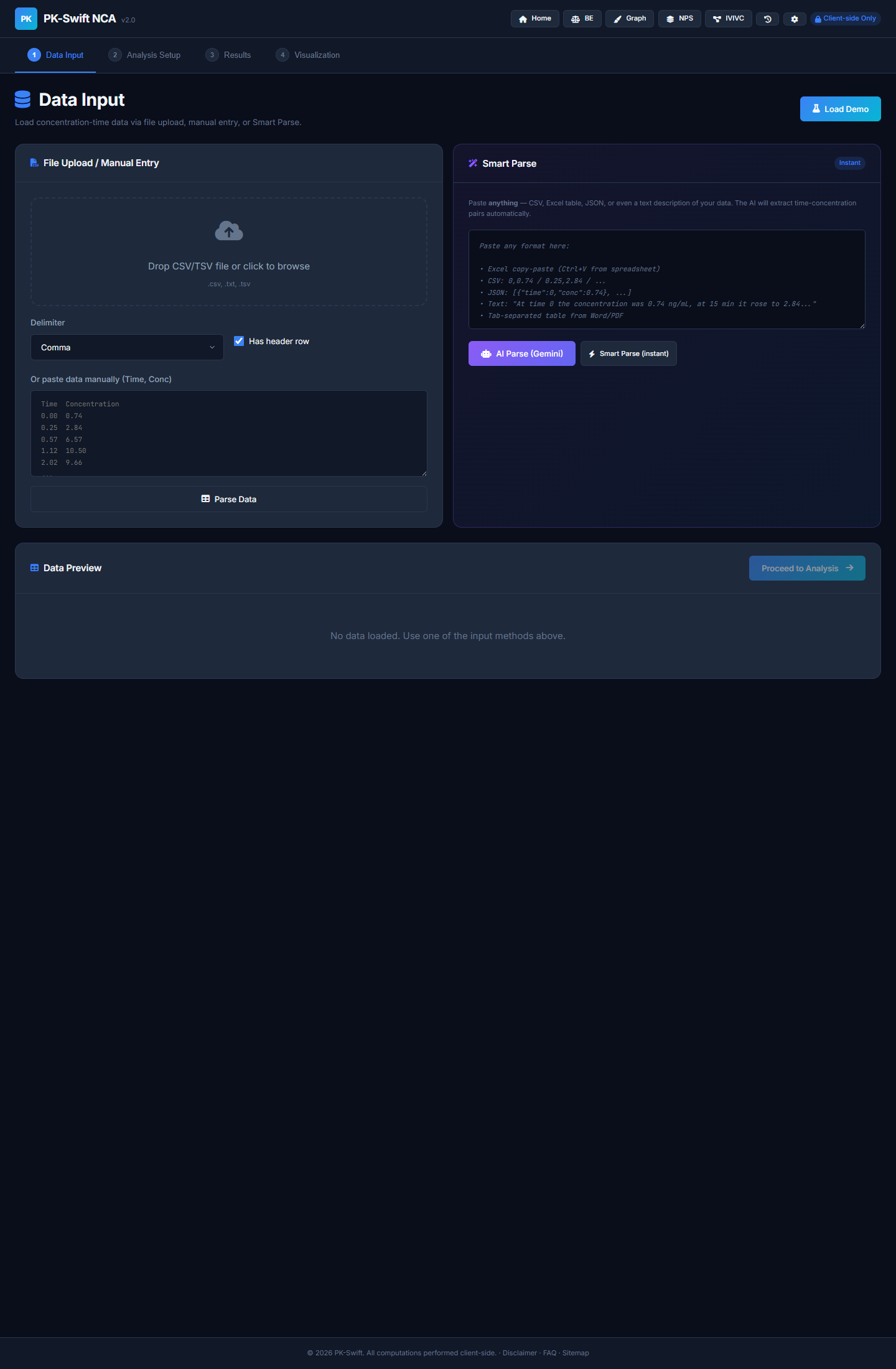
Real inputs were a mix of Excel paste, natural language notes, weird separators, and "I copied this from a PDF and hope for the best." So PK-Swift moved to a dual parser model:
- Smart Parse: offline, rule-based, instant
- AI Parse: Gemini-based rescue mode for messy data
The turning-point was when parsing became a first-class feature instead of an afterthought. That required building not just one parser, but a fallback chain where one format's failure automatically tries the next.
📋 What does real pharmacokinetic data actually look like?
Here's the problem that pharmacology textbooks never mention: real PK data is inherently messy.
In theory, you get a spreadsheet with clean columns: Time (hours), Concentration (ng/mL), maybe Standard Deviation. That's what lab SOP documents promise. Real data? Far weirder.
You get Excel files where someone hardcoded the dose in cell A3 as "200mg @ 0800", then the actual time-conc data starts at row 12 with no header row. You get PDF exports that were copy-pasted into a text editor, with hidden formatting characters still attached. You get natural language notes like "at 2 hours the level was 5.3" buried in a wall of clinical observations. You get semicolon-delimited data from European LIMS systems, pipe-delimited output from old laboratory instruments, and mysteriously, space-separated data with inconsistent column widths.
And BLQ (Below Limit of Quantification) markers? Those come in five different flavors: BLQ, BQL, <LLOQ, ND (not detected), or just a plain -. A robust parser needs to recognize all of them and treat them identically: as zero concentration. Miss one flavor, and your NCA calculation gets corrupted.
PK datasets are also characteristically small. Most PK studies run 10–20 timepoints per subject. A clinical trial might analyze 30–50 subjects. So you're typically parsing between 300 and 1,000 data points at a time. That's not big data. But it's precise data—the kind where one character out of place, one misaligned column, one typo in a BLQ marker breaks the entire pipeline.
The old approach: "User must enter valid CSV format." The new approach: "I'll handle whatever format you throw at me, and if it's truly chaotic, I'll ask AI for help."
⚙️ The dual-parser cascade
User Input (any format)
        │
        ▼
┌──────────────────────────────────┐
│ SMART PARSE (Offline Chain)       │
├──────────────────────────────────┤
│ 1. Try JSON parse                │
│    - Explicit, fast, unambiguous │
│    └─ Success: return            │
│                                  │
│ 2. Try tabular parse             │
│    - CSV, TSV, Excel paste       │
│    - Auto-detect delimiter       │
│    - Recognize BLQ markers       │
│    └─ Success: return            │
│                                  │
│ 3. Try natural language extract  │
│    - "at 2h conc was 5.3"        │
│    - "(0, 0.74), (0.25, 2.84)"   │
│    - "0 → 0.74" arrow patterns    │
│    └─ Success: return            │
│                                  │
│ 4. All failed: throw error       │
└──────────────────────────────────┘
        │ (failure only)
        ▼
┌──────────────────────────────────┐
│ AI PARSE (Gemini Fallback)       │
├──────────────────────────────────┤
│ - Send to Gemini with strict     │
│   instructions: "Return only     │
│   valid JSON, no explanation"    │
│ - temperature: 0.1 (low random)  │
│ - maxOutputTokens: 32,000        │
│                                  │
│ - Parse response as JSON         │
│ - Validate & normalize           │
│ └─ Success: return with          │
│    source: 'ai-gemini'           │
└──────────────────────────────────┘
        │
        ▼
User gets parsed data (with confidence metadata)
💻 What changed in code
The Smart Parse pipeline uses a sequential fallback model. Here's the real implementation from PK-Swift:
/**
 * Universal parse: tries JSON → Tabular → Natural Language.
 * Completely offline, no API key needed.
 */
function universalParse(text, opts = {}) {
  if (!text || !text.trim()) throw new Error('No input text provided.');

  // 1. Try JSON parse first (explicit, fastest)
  const jsonResult = tryParseJSON(text, opts);
  if (jsonResult) return jsonResult;

  // 2. Try tabular parse (CSV, TSV, Excel paste, etc.)
  const tabResult = localParseFreeform(text, opts);
  if (tabResult) {
    if (tabResult.data && tabResult.data.length >= 2) return tabResult;
    if (tabResult.groups && Object.keys(tabResult.groups).length > 0) return tabResult;
  }

  // 3. Try natural language extraction
  const nlResult = tryParseNaturalLanguage(text);
  if (nlResult) return nlResult;

  throw new Error('Could not parse input. Supported formats: CSV, TSV, Excel paste, JSON, semicolon-separated, or "time value, conc value" pairs.');
}
The tabular parser auto-detects delimiters by scoring consistency:
function detectDelimiter(lines) {
  const sample = lines.slice(0, Math.min(10, lines.length));
  const delims = [
    { d: '\t', name: 'tab' },
    { d: ';', name: 'semi' },
    { d: ',', name: 'comma' },
    { d: '|', name: 'pipe' }
  ];

  let best = null;
  let bestScore = -1;

  for (const { d } of delims) {
    // Split sample lines, count columns per delimiter
    const counts = sample.map(l => l.split(d).length - 1);
    const minCount = Math.min(...counts);
    if (minCount < 1) continue;

    // Score: delimiter that gives consistent column counts wins
    const consistent = counts.every(c => c === counts[0]) ? 2 : 1;
    const score = minCount * consistent;
    if (score > bestScore) { bestScore = score; best = d; }
  }

  return best || /\s+/; // fallback to whitespace
}
BLQ marker recognition baked in as a global:
const BLQ_MARKERS = new Set([
  'BLQ', 'BQL', '<LLOQ', 'NS', 'N/A', 'NA', 'ND',
  'BLOQ', '.', '-', '--', 'MISS', 'NC'
]);
Natural language parsing handles multiple patterns:
// Pattern 1: "at TIME ... CONC"
const nlPattern1 = /(?:at|time|t\s*=?)\s*([\d.]+)\s*(?:hours?|hrs?|h|min(?:utes?)?|days?)?\s*[,:;]?\s*(?:the\s+)?(?:concentration|conc|cp|c)\s*(?:was|is|=|:)?\s*([\d.]+)/gi;

// Pattern 2: "0h 0.74  0.25h 2.84  0.57h 6.57" (number-unit pairs)
const nlPattern2 = /([\d.]+)\s*(?:h(?:ours?|rs?)?|min(?:utes?)?|d(?:ays?)?)?\s*[,:;→-]?\s*([\d.]+)\s*(?:ng|µg|mg|ug)?(?:\/m[lL])?/g;

// Pattern 3: Inline pairs "(0, 0.74), (0.25, 2.84)"
const pairPattern = /\(\s*([\d.]+)\s*,\s*([\d.]+)\s*\)/g;

// Pattern 4: Arrow/colon pairs "0 → 0.74" or "0: 0.74"
const arrowPattern = /([\d.]+)\s*[→=>:]\s*([\d.]+)/g;
If Smart Parse exhausts all options, AI Parse takes over. It calls Gemini with deterministic settings:
async function aiParseFreeform(text, opts = {}) {
  const { multiGroup = false } = opts;

  let prompt = multiGroup
    ? `Extract time-concentration data from input. May contain MULTIPLE groups.
       Return ONLY valid JSON: {"groups": {"Group1": [{"time": 0, "conc": 0.74}, ...]}}`
    : `Extract time-concentration pairs from input.
       Return ONLY valid JSON: [{"time": 0, "conc": 0.74}, ...]`;

  const resp = await fetch(`${GEMINI_ENDPOINT}?key=${key}`, {
    method: 'POST',
    headers: { 'Content-Type': 'application/json' },
    body: JSON.stringify({
      contents: [{ parts: [{ text: prompt }] }],
      generationConfig: {
        temperature: 0.1,         // Deterministic, low creativity
        maxOutputTokens: 32000    // Room for large datasets
      }
    })
  });

  const json = await resp.json();
  const text = json?.candidates?.[0]?.content?.parts?.[0]?.text;
  // Parse, validate, normalize response...
  return { data, source: 'ai-gemini' };
}
Notice: temperature: 0.1 keeps the model deterministic. maxOutputTokens: 32000 handles large datasets. The prompt is strict: "Return ONLY valid JSON, no explanation."
📊 Smart Parse vs AI Parse: feature comparison
| Feature | Smart Parse | AI Parse |
|---|---|---|
| Cost | Free (client-side) | ~$0.02 per call (Gemini) |
| Speed | <50ms (instant) | 1–3 seconds (API round-trip) |
| Offline | Yes, fully local | No, requires Gemini API call |
| API Key Required | No | Yes (user provides) |
| Formats Supported | JSON, CSV, TSV, Excel paste, semicolon, natural language | Any format with structure |
| Error Messages | Specific ("Line 4: invalid value") | Generic ("Gemini returned invalid JSON") |
| Reliability (clean data) | 95%+ | 85%+ |
| Reliability (messy data) | 40–60% | 80%+ |
| If API Quota Dies | Still works 100% | Only Smart Parse available |
| Best Use Case | Standard exports, clean formats | Corrupted PDFs, handwritten notes, weird instruments |
| Worst Case | Graceful rejection; user retries | Hallucinates plausible but wrong data (rare) |
The key insight: Smart Parse is your shield. AI Parse is your insurance.
🔑 Why this architecture matters for real users
Rule-based parsing handled ~80% of user inputs fast. No API key setup, no latency, no cost, fully offline. Clinical teams who can't share data with third-party APIs? Smart Parse is enough.
AI parsing handled the "this data is cursed" scenarios. A PDF screenshot of a table. Handwritten notes transcribed into text. A discontinued lab instrument's proprietary export format. A researcher's messy notes copy-pasted from an email.
That split removed a critical friction point. Users were no longer blocked by one strict pathway. If their data looked weird, they tried AI Parse. If they had no API key, Smart Parse still worked. If Gemini API went down, their existing data still parsed.
Also: giving users a fallback path is product empathy in disguise. You're saying: "I know your data is messy. I built two different ways to handle it. Try one, then the other. You won't get stuck."
🎯 Lessons from building a dual-parser system
Build a fast local path first. "Works offline" is both a trust signal and a cost shield. Users pay nothing per parse, no dependency on external services, no quota concerns. That's worth the extra effort.
Add AI as fallback, not foundation. If the Gemini API dies or the user never configures an API key, your app should still function. Smart Parse must never depend on AI.
Keep parser errors human-readable. "Line 4: expected number, got 'abc'" is infinitely more useful than "Parse failed." Specific errors let users debug their input; vague ones just create support tickets.
Disclose API key handling clearly. "Stored in your browser's localStorage, only sent to Google's API" is honest and builds trust more than vague claims like "military-grade encryption." Users respect transparency over false security theater.
Treat input diversity as a product requirement, not user error. Don't blame users for messy data. Expect it, design for it, ship with it. The moment you say "just enter CSV," you've already lost 30% of your users.
Choose your AI model for speed and cost, not for sophistication. We use Gemini Flash (fast, cheap, low-latency) over heavier models. For a parser, cost per call and response time matter more than nuance. A 2-second parse on bad data beats a 10-second perfect parse.
Test on real garbage data. Not synthetic test cases. Real PDFs, real lab exports, real transcriptions, real messy hospital notes. If your parser survives your worst real-world input, you're ready to ship.
💡 The joke that's also profound
I learned that users do not "enter data." They launch data at your app like confetti. Sometimes it's organized confetti. Sometimes it's data that's been through five different systems, OCR'd, copy-pasted, transcribed by someone taking notes in a hospital hallway, and accidentally had some numbers changed.
If your parser survives confetti, you can ship it.
2026.02.10
Written by
Jay Lee
Korea-Licensed Pharmacist (#68652) · Senior Researcher
Korea University, College of Pharmacy (B.S. + M.S., drug delivery systems & industrial pharmacy). Building production-grade AI tools across medicine, finance, and productivity — without a CS degree. Domain expertise first, code second.
About the author →Related posts